

Auto captions for Shorts, TikTok and Reels
Every short ViewGum makes has captions burned in, timed to each spoken word and kept inside the safe box, clear of the buttons and post text on YouTube Shorts, TikTok, Instagram and Facebook. They show one word at a time or in short phrases, with key words picked out. Ask for another style and they change.
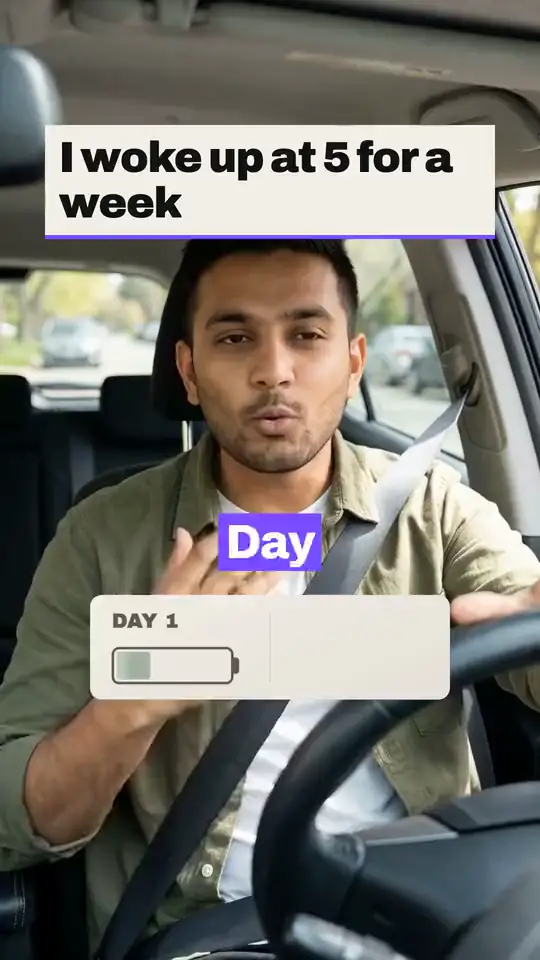
How the captions are made
- Every word gets a time: from speech recognition on a take you upload, or from the voiceover on a faceless short.
- The words are shown one at a time, or grouped 2 to 6 at a time as the edit style sets.
- Key words are picked out in an accent color, and in a talking-head edit a number you say shows on its own, larger.
- The captions are drawn into the video, so they look the same on every app and show with the sound off.
Caption styles
In a talking-head edit
Each edit style sets its own: Punchy runs short phrases, Clean and Story longer ones. Ask in the edit for another look (clean, boxed, karaoke, minimal or punch), a size, an upper, middle or lower position, more or fewer words per caption, or no captions.
In a faceless short
Your channel's default sets them: Auto, One word at a time, Short phrases. On Auto, the look turns over from one short to the next.
Where the captions sit
In the middle of the frame: clear of the top 15%, the bottom 35%, the outer 11% of each side and the button column on the right. That keeps them out from under each app's tabs, buttons and post text.
Covered by the app, in a 1080 x 1920 frame
- The top 8% of the frame, where the feed's tabs sit.
- A column down the right 17%, from 46% to 73% of the way down, where the like, comment, share and save buttons sit.
- The bottom 27% of the frame, where the account name, the post text and the sound sit.
The safe box, where captions, titles and graphics go.
Burned in, or the app's own captions
The app's own captions
YouTube adds automatic captions to Shorts, and TikTok has offered auto captions since April 2021. Viewers switch them on or off, the look is the app's, and YouTube says their quality may vary and asks creators to review them.
Burned-in captions
They are part of the picture, so everyone sees them, on every app you post to, in the look you picked. A viewer can't turn them off, so check them before you export.
Readable at a glance
Broadcast subtitles have firm limits. Short-form captions run shorter, so treat these as a ceiling.
Captions and accessibility
- 1.2.2is the WCAG 2.2 rule that prerecorded video carries captions, which should say who is speaking and include meaningful sound effectsAs of October 18, 2026, source 4
ViewGum's captions carry the spoken words only. They don't name the speaker or describe sounds, so a video that needs full captions needs those added.
Questions
Does YouTube do auto captions for Shorts?
Yes. YouTube's automatic captions cover Shorts as well as long videos, and YouTube asks creators to review them because their quality may vary (YouTube Help, checked October 18, 2026). ViewGum's captions are burned into the video instead, so they show without anyone switching them on.
How do you caption your Shorts?
In ViewGum the captions are part of the edit. Upload a take or make a faceless short, and the export has them burned in. To use each app's own captions instead, the guide below walks through each one.
How do you auto caption reels?
Make the reel in ViewGum and export it. The captions are already in the video, so it posts to Instagram and Facebook with them, with nothing to switch on.
What are the best captions for YouTube Shorts?
Ones people can read at a glance with the sound off: a few words at a time, timed to the voice, and clear of the buttons and the title at the bottom. That's how ViewGum sets them.
Should I use burned-in captions or the app's own?
Burned-in captions show for everyone, look the same on every app you post to, and can't be switched off, so check them before you export. The app's own captions are switched on by the viewer and take the app's look.
Can I fix a caption word?
Yes. In a talking-head edit, ask for the fix and the caption changes without touching your audio. A faceless short's captions follow its script.
Which languages are captioned?
English. Captions come from English speech recognition for now.
Can I download a caption file?
No. The captions are burned into the MP4, and there is no separate caption file.
Caption your first short
Upload a take or make a faceless short, and it exports with its captions in.
Start freeSign in with Google. New accounts get bonus credits to start.
Sources
- Use automatic captioning, YouTube Help
- Introducing auto captions (April 6, 2021), TikTok Newsroom
- English (USA) Timed Text Style Guide, Netflix Partner Help
- Understanding SC 1.2.2: Captions (Prerecorded), WCAG 2.2, W3C
Last updated October 18, 2026.